Friday, 5 January 2018

Beginner’s Guide to Artificial Intelligence, Machine Learning, Neural Network and Deep Learning (Part 2/2)

This article is in continuation to my previous article. You can read that post here.
Artificial Neural networks (ANN) and Neural Networks (NN), is another approach to teach computers to think, decide and decipher the environment like humans. This approach is synonymous to our understanding of human brain (biology): interconnections among neurons. NN are typically visualized as systematic interconnection of neurons, which exchange data or messages among each other. These connections have weights (numbers) that is updated based upon experience, thereby making NN adaptive to inputs and capable of understanding and learning.
Hence, this approach works on probability: based upon input, it gives recommendations or predictions with a certain confidence level. A feedback mechanism enables learning. Hence, by feedback, it understands if its recommendations/predictions are correct or incorrect, and consequently, updates the approach it undertakes for the future event. For example, it can say with 80% confidence that an image is a cat’s image, 10% confidence that it is a leopard’s image, 6% confidence that it is a cheetah and so on – and then the feedback mechanism of the network architecture tells NN if it is correct or incorrect.
Because of the high computation intensity required to run even the most basic neural networks, it was not commercially feasible and not practical. The advent of GPUs in this field is promising and we hope to see some results in near future. The advantage of pursuing NN is that it retains the advantages of machines over humans like speed, lack of bias and accuracy while trying to mimic human brain.
Once we have a basic understanding of NN, let us now shift our focus to Deep Learning. Deep Learning refers to NN that are many layers deep. Deep Learning is deep because of the structure and architecture are ANNs. When NN was conceptualized, they were just two layers deep and I just mentioned earlier, it was computationally not feasible to build large networks. With GPUs, it is possible to build NN with 10+ layers.
Therefore, in deep learning, layers of neurons are stacked on top of each other. The job of lowest layer is to take inputs in the form of text, images, sound etc. Each neuron, then, stores some info about the data elements they encounter. Now, at the above layer, a more abstract version of the data is transmitted. Hence, the higher the layer, the more abstract you learn.
The best use case of ANN is extraction of features from images without any human intervention. Feed ANN an image and it will compute features like colors distribution to something like if a cat is running or sitting. The only requirement of such computation is training of ANNs, which require massive data.
With Big Data sources like Twitter, Facebook, etc. we have data corpus not available 2 or 3 decades back. Still, the challenge lies in cleaning and processing of data into right format, which can be fed to the machine learning algorithms.
I sincerely want to thank Michael Copeland and Bernard Marr (@bernardmarr) for shaping my thoughts on AI over the months.
{The examples used in the above blog are a bit far-fetched and ahead of the current time. They are provided to draw parallelism from the real word and easy understanding.}

Tuesday, 2 January 2018

Beginner’s Guide to Artificial Intelligence, Machine Learning, Neural Network and Deep Learning (Part 1/2)

AI, ML, Neural Networks and Deep Learning are some of the buzzwords of today’s world. They are disrupting the way in which traditional business operate. Many service-based organizations are branding themselves as pioneers and leaders in these frontiers. However, before putting money into any of these AI branded assets, it becomes very important to understand the business use-case of these technologies (on which I shall write later). Currently, I shall focus upon facilitating the beginner’s understanding of these buzzwords.
Artificial Intelligence, in the easiest language, is used when machines can take decisions and perform actions (easy or complex) intelligently and smartly, implying, it can mimic human activities, like learning and solving problems.
AI may be classified into two categories: Applied AI & General AI. Applied AI is what is creating the buzzword in today’s world: autonomous cars (Volvo S60 Drive Me), virtual agents (Louise, the virtual agent of eBay), playing strategic games (Go & Chess) against humans etc. Hence, they are specific to a case in point. General AI is what we have seen in movies like Ultron (from Avengers series) & Ava (from Ex Machina) i.e. they have the capability to mimic the human and can perform actions like those that humans do.
An interesting observation is that actions taken by machines, which were once categorized as intelligent, are no longer considered intelligent. For e.g. Optical Character Recognition. Hence, just like human’s approach (metrics to measure) to intelligence (psychology) varies, the metrics as to what actions define artificial intelligence and what not, may require continuous change.
Now, let us try to understand Machine Learning. ML, in the simplest form, is the ability of the machines to parse data, categorize it, learn that categorization and then perform some actions or give some predictions on cases for which it was not trained. So, rather than the traditional IF… ELSE statements, using algorithms like clustering, decision tree, inductive logic & Bayesian networks, the machine is trained using large volumes of data after which it can perform some task for which it was trained for.
I shall take a very novice example to explain it. Suppose the machine is trained on all the past matches of Roger Federer. His opponents, tournaments, practice sessions, performances at all levels, etc. Now based upon this training, if the machine is able to identify Federer’s odds of winning against any opponent.
Two more “learning” keywords used frequently are Supervised learning & Unsupervised learning.
Supervised learning happens when a bot is trained on corpus of data and the output is defined. If the outputs are defined as classes, then it is a classification problem. If the output is continuous, then it is a regression problem. There are many use-cases defined for classification. For e.g.:
1. To classify, if the financial transaction is fraudulent or not
2. To classify the different types of objects in an image (fruits, vegetables)
3. To classify the given texts into different categories (if the tweet is about football, cricket etc.) in Natural Language Processing (NLP).
Unsupervised learning takes place when the bot starts to learn and take decisions from itself (a concept called self-learn).
Let us understand these two concepts from a real world example.
Case 1: Supervised Learning
Vipul is a kid. He sees different kinds of fruits. His father tells him that this particular fruit is an apple, orange etc. Now a new fruit comes in front of Vipul, which he has not seen before. Vipul identifies it as an apple – and not as a mango, papaya etc.
Here, I had a teacher to guide me and help me learn new concepts, so that when a new object came my way to which I had not been trained, I was still able to categorize and identify it.
Case 2: Unsupervised Learning
Vipul is a kid. He went to North Korea, a country about which he had no prior knowledge – no information on their culture, food, tradition, language etc. However, Vipul tries to learn and make sense of his surrounding – what to eat, how to greet people, how to pray etc.
This is unsupervised learning because in this case, though, I had many data around me, I did not know how to derive meaning out of it or rather what to do with it. Here I had no teacher to guide me and I had to figure out a way on my own. Then, after some time, based upon certain learning, I started processing these data into information categories that made sense.
(The rest of the knowledge will be shared in the second part. )

Sunday, 26 November 2017

The New Wave in IT - RPA & Cognitive Bots

We have been reading and listening a lot on automation, robotic process automation and cognitive “bots” (consider the "bots" as software equivalent of robots) these days. Though there is no clear indication as to which assets falls under which category, I would like to put forward my ideas for a general layman understanding of these keywords.
Automation is the application and implementation of technology so that any job, task, process etc. can function automatically. Automation makes life easier, convenient and increases efficiency in day-to-day operations. Integration of systems, automating workflows so that certain pre-defined actions gets triggered at each level, improving the speed with which business processes takes place. Automation is technology dependent and requires complex integration. For e.g. the automated meters helps consumers when they fill-in gas. Or the time when you had to stand in queue for a long time to withdraw cash, that process has been automated via ATM machines.
Automation, as you can comprehend, is a very wide term. We can classify them as robotic process automation(RPA) or cognitive automation
Now let’s understand robotic process automation.
Think of any business or IT process which was earlier done by humans, for e.g., consider filling up 40 fields in an order placing form. The steps in the order placing process involves copying data from one of the standard templates and pasting it in another standard template. As you would have understood by now, this process is pretty straight-forward and does not require any knowledge worker. Hence, if in some way, we can write a piece of code which can read the field from the source and paste it in destination template, we have achieved automation!
So, in general, robotic automation. And hence, no human intervention is required for that job.
Having set the ground for RPA, let’s now understand cognitive automation.
Cognitive automation allows the “bots” to make decisions based upon inputs, just like humans do. It requires training before deployment as to what it has to do. For e.g. consider the same copy-paste example. From the standard input template, the bot copies the data, but now the output (pasting template) forms’ language i.e. the language of the order placing depends upon certain field of the input template, and hence automation, in this case can be achieved by cognitive bot. The Cognitive bot will translate the whole output form in the required language and then finally place order.
Now, let me take another example to distinguish robotic and cognitive automation. Consider a job which involves putting cashew nuts at the center of hand-made biscuits.
Case in point: Robotic Process Automation
Here the shape of the hand-made biscuit is fixed and hence the “bot” knows where is the center of the biscuits and hence can put the cashew at its center.
Case in point: Cognitive automation
Interestingly, now there is a flexibility on the shape of the biscuit, implying the shape can be circle, rectangle, heart etc. Nevertheless, the “bot” figures out the shape of the biscuit and makes a decision as to where the center of that shape is and puts the cashew there.
Given the current market scenario, it is imperative that you understand what is the underlying definition of RPA vs Cognitive bot and what capabilities you can expect out of them.

Sunday, 23 April 2017

Hi Guys,

Today, I received a strange error while using outlook. The error has the following message:


That is a very common issue when you try to open apps which are synced with Outlook (in my case Skype). So, as you can see, this error is caused because your Outlook crashed but the Skype (or Lync) still has a reference to that .ost (the outlook data file has an ost extension) file.

So let’s see how this can be solved.

There are 2 methods to solve the issue:

Process 1:

#1: open run, press Windows + R button

Enter the path \Program Files (x86)\Microsoft Office\Office14\


Or you may have to use this path:


#2: Find Scanpst.exe and run it


Process 2:

#1: Run ProcessExplorer and choose "Find Handle or DLL" from the Find menu.

#2: Search for '.ost'. This will display all open handles to your Outlook data file.

#3: Choose to close all handles to your .ost file

#4: Start Outlook again


& that’s it. You can use any of the two methods to resolve this error.

Now happily enjoy your outlook and Skype J

Rest Is Next!

Thanks,
Vipul

Tuesday, 27 December 2016

All About f.lux

Hi Friends,

Seems like this is going to be my last blog in 2016! So, I decided why not discuss a tool which is good for you & your eyes.

So, let's discuss f.lux tool. I thank my friend Tarun for this!

To find if you have f.lux installed on your Win machine, go to Cortana as type Programs and Features. 


Otherwise, go to Start -> Settings ->  System-> Apps & features


and then, on the right panel, you can see:


So, let's get started by understanding what it means & what it does:

As per Wikif.lux is a proprietary computer program that adjusts a display's color temperature according to location and time of day. The program was designed to reduce eye strain during night-time use and reduce disruption of sleep patterns.

That actually very well summarizes it. I found another useful link which provides all the general queries related to f.lux as a FAQ. You can read it by clicking here. [Or by copy-pasting the link on your browser: http://tinyurl.com/mmtsw3a]

So, now that you have all the necessary information, have a great sleep!

Good Night!
(For my EST pals)

Friday, 21 October 2016

Most Common Problem in Outlook & Skype: Resolved

Hi Guys,
Today, I received a strange error while using outlook. The error has the following message:


That is a very common issue when you try to open apps which are synched with Outlook (in my case Skype). So, as you can see, this error is caused because your Outlook crashed but the Skype (or Lync) still has a reference to that .ost (the outlook data file has an ost extension) file.
So let’s see how this can be solved.
There are 2 methods to solve the issue:
Process 1:
#1: open run, press Windows + R button
Enter the path \Program Files (x86)\Microsoft Office\Office14\


Or you may have to use this path:


#2: Find Scanpst.exe and run it


Process 2:

#1: Run Process Explorer and choose "Find Handle or DLL" from the Find menu.
#2: Search for '.ost'. This will display all open handles to your Outlook data file.
#3: Choose to close all handles to your .ost file
#4: Start Outlook again

& that’s it. You can use any of the two methods to resolve this error.

Now happily enjoy your outlook and Skype.

Rest Is Next!
Thanks,

Vipul

Thursday, 29 September 2016

Clean Your Google Chrome Browser: 5 Simple Steps

Hi Friends!

In this post, I am going to explain how can you get rid of all the crashes, unusual startup pages, toolbars, unexpected ads or anything else which diminishes your browsing experience in Chrome.

So let's get started.

#1: Navigate to the URL: https://www.google.com/chrome/cleanup-tool/
You will see this clean & sleek page:


#2: Press on the Download now button

#3: Once downloaded, run the utility

#4: Once installed, it will then start scanning for programs causing issues


#5: And then finally it will show the results!


& that's All!

Now you can have an amazing experience using Chrome!

Don't thank me guys, thanks Google. :P

Rest Is Next!
Cheers.

Monday, 9 May 2016

Java Not Working in Web Browsers:

Hello friends!

Recently, Keepvid.com (website which allows you to download videos from YouTube) added a new feature of downloading mp3 of the pasted URL.

Now, if you are using Keepvid, you would know that downloading in various formats and sizes is way too easy here. But this  new feature of download as mp3 in Chrome does not work.

In this blog I am going to highlight one of the most common issues which pops up when you try to download items from internet- Java not enabled in your web browser!

Also, it's quite possible that even after installing Java, Applets do not run.


                             [This screenshot of error was taken while using Google Chrome]

So let's get started,

The cause to this problem is : Java is not enabled in the web browser. If Java is already installed but applets do not work, you need to enable Java through your web browser.

The most generic solution to this problem is If you recently installed Java, you may need to restart your browser (close all browser windows and re-open), in order for the browser to recognize the installation. In addition, make sure Java content in the browser is enabled through the Java Control Panel

I will give browser specific solutions.

#1: Internet Explorer
* Click Tools and then Internet Options
* Select the Security tab, and select the Custom Level button
* Scroll down to Scripting of Java applets
* Make sure the Enable radio button is checked
* Click OK to save your preference

#2: Firefox
* Open the Firefox browser or restart it, if it is already running
* From the Firefox menu, select Tools, then click the Add-ons option
* In the Add-ons Manager window, select Plugins
* Click Java (TM) Platform plugin (Windows) or Java Applet Plug-in (Mac OS X) to select it
* Check that the option selected is Ask to Activate or Always Activate or on older Firefox versions, click on the Enable button (if the button says Disable, Java is already enabled)

#3: Safari
* Click on Safari and select Preferences
* Choose the Security option
* Select Allow Plug-ins, then click on Manage Website Settings
* Click on the Java item, select an option (Ask, Allow or Allow Always) from the pulldown list when visiting other websites
* Click Done, then close the Safari Preferences window

#4: Google Chrome
Chrome no longer supports NPAPI (technology required for Java applets)

The Java plug-in for web browsers relies on the cross platform plugin architecture NPAPI, which has been supported by all major web browsers for over a decade. Google's Chrome version 45 (scheduled for release in September 2015) drops support for NPAPI, impacting plugins for Silverlight, Java, Facebook Video and other similar NPAPI based plugins.

Java applications are offered through web browsers as either a web start application (which do not interact with the browser once they are launched) or as a Java applet (which might interact with the browser). This change does not affect Web Start applications, it only impacts applets.

If you have problems accessing Java applications using Chrome, Oracle recommends using Internet Explorer (Windows) or Safari (Mac OS X) instead.

Hope this article allows you to seamlessly download videos now.

Rest is Next.

Cheers,
Vipul

Thursday, 14 April 2016

Export or backup Outlook .pst file: All MS Office Versions

Hallo Vrienden!

This is your goed oud vriend Vipul, back again with a simple yet powerful trick. I thank my friend Jaspreet for this article.

Today, we will learn how to export your MS Outlook file to an USB, your laptop's hard disk or any other secondary storage.

Why you should do this? 
You are continuously on the go, switching between jobs etc. hence, you would always want a backup of all your past history so that you don't have to follow up with your ex-cos teammates for certain mail communication.

So let's get started!

Let's see, I just found a very informative step-by-step process of how this could be done. So, here I would give reference to that article and would request your queries in the comment section below.

Link to the article, please click here [or copy the address in your browser: https://support.office.com/en-us/article/Export-or-backup-email-contacts-and-calendar-to-an-Outlook-pst-file-14252b52-3075-4e9b-be4e-ff9ef1068f91]


Rest is Next!

Proost...
Vipul 

Optimize Laptop Performance: Part 1 Optimize Drives

Hola Amigos,

In this blogpost, I am going to share the easiest method to improve your laptop's disk performance.

Wanna make a guess, well some hints: hard-disk, easiest, performance improvement!

Yes, you got it right, I am talking about disk optimization and defragmentation. (for those who didn't get it correct, it's cool! You are reading this because you wish to learn, right?)

But, before we learn how to do it, let's understand in simple terms what it means:

Fragmentation occurs when your system performs common memory function like creating, modifying or deleting files. So, what happens is that at some point of time, the OS (Operating System) needs to store these files in non-contiguous clusters and this results in improper utilization of disk clusters resulting in fragmentation. There are 2 types of fragmentation:

#1: Internal Fragmentation: Suppose each block of memory is 1024 Kb. Now if the OS allocates a block of this size to a process which requires 900 Kb, then the rest of 124 Kb (=1024-900 Kb) becomes unavailable for usage for other processes. This is internal fragmentation.

As you can see, the white space in the above illustration represents Internal Fragmentation

#2 External Fragmentation: This will be more clear from the figure below.


Now, suppose there is a process which has requested OS for 5 memory block. As you can see the above cluster contains 5 free memory blocks (in white), but the OS will not allocate them because these spaces are not contiguous! This is External Fragmentation.

Now is the time to resolve both these issues using the defragment option. So let's get started.

Step #1: Choose the drive which you want to optimize and then right click -> Properties


Step #2: Navigate to Tools tab and then click on Optimize as shown below


Step #3: Select the drive to defragment, click on either Analyze or Optimize (depending upon what you want to do)


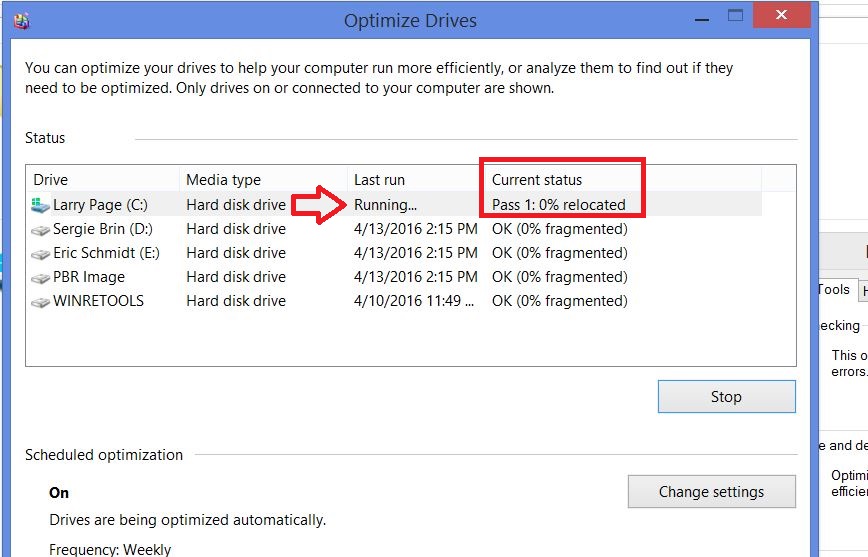
There is actually no Step #4. If you clicked upon Optimize, then you will see the progress as shown below:

That's it! Now do it for all the drives which are fragmented and you surely going to have an improved disk-related operations.

Have any other ideas. Leave it in the comments section below.

Rest is Next!
Vipul